Plugins
See which plugins and tools a Nistor deployment runs, what each one adds, and how to ask for one that is missing.
Goal: know what this deployment of Nistor can do, and which module to ask for when a page you need is missing.
Nistor is built from a core, tools that connect it to outside systems (BigQuery, Dataform, MicroStrategy, GitLab and others) and plugins that add features (pages, capabilities and background workers). Concepts explains the difference.
Prerequisites#
- You can sign in. The Plugins page needs no permission.
Steps#
- In the sidebar, open Platform → Plugins.
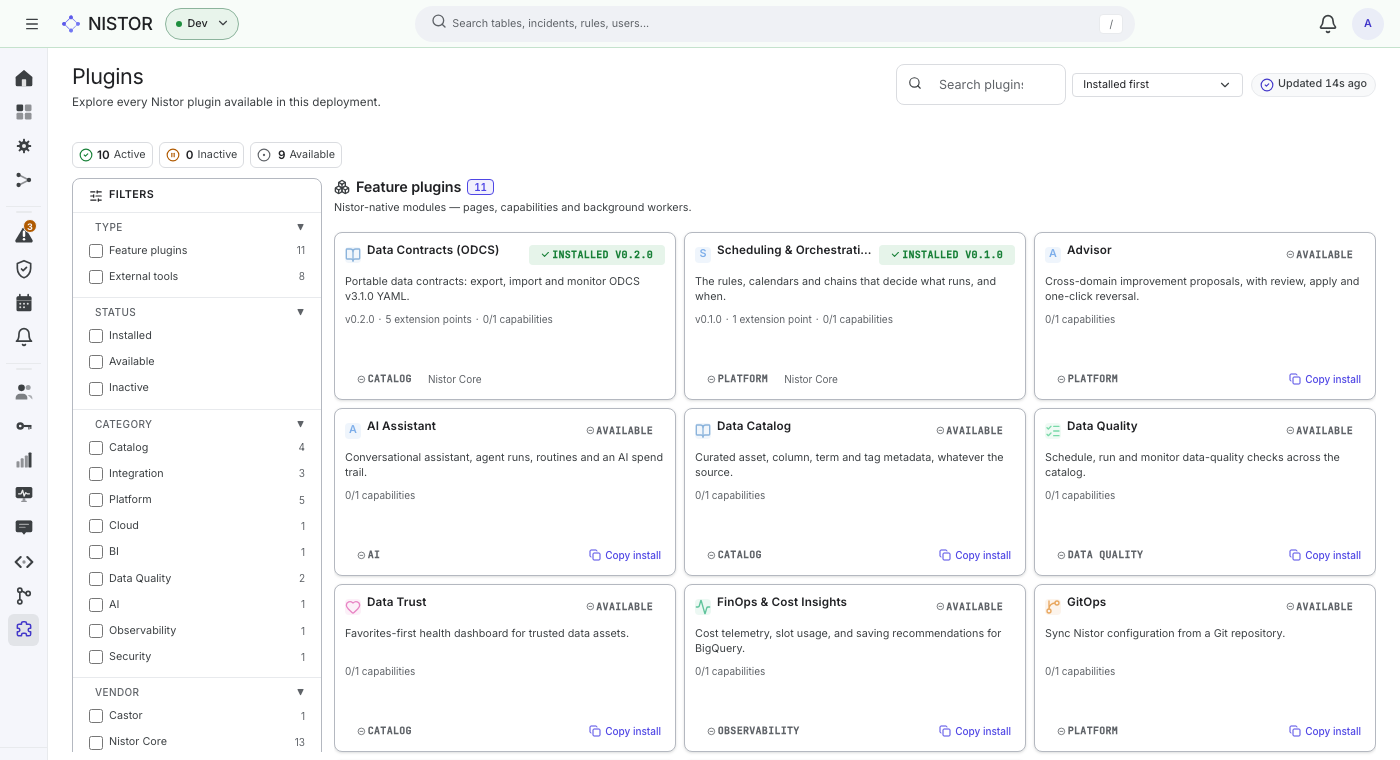
- The counters at the top give the number of Active, Inactive and Available plugins. Choose one to filter the list.
- Narrow the list with FILTERS: TYPE (Feature plugins or External tools), STATUS (Installed, Available, Inactive), CATEGORY and VENDOR.
- Read a card: the name, an INSTALLED mark with the version (or AVAILABLE), a one-line description, the number of extension points and capabilities, the category and the vendor.
- Choose a card to open its details: Overview, What this plugin provides, Capabilities, Requirements, Compatible with, Install, and links to its Documentation and Homepage when it has them.
What you should see#
On the quickstart stack, the installed feature plugins include Data Contracts (ODCS) and Scheduling & Orchestration. The installed tools include Castor (Coalesce Catalog), GitLab and Dummy (test tool), a tool that does nothing on purpose so that you can exercise rules from end to end. Modules such as AI Assistant, Data Quality and FinOps & Cost Insights show as AVAILABLE: they are Enterprise modules, which this open-source stack does not install.
When a module is missing#
An available plugin's card has a Copy install button that copies its package's install command. Installing a plugin into a deployed instance is an operator's job: it changes the deployment's distribution, the list of packages the deployment runs, and its runtime image (see Distribution, lock in the glossary). Send the copied command and the reason you need the plugin to your operator.
Next#
- Connect another system: Integrations.
- Write your own: Writing a tool and the Plugin SDK.